Single board computers (SBCs) put a complete computer, meaning processor, memory, storage interface and input/output, on one circuit board. That simple idea is why they now run everything from classroom coding kits to factory controllers and roadside sensors. The future of SBCs is less about replacing desktop PCs and more about putting capable, low-power computing exactly where data is created: on the machine, in the vehicle, or at the edge of a network. This guide explains where SBCs came from, how hobby boards differ from industrial ones, what they are used for, and the trends shaping the next few years.
What is a single board computer?
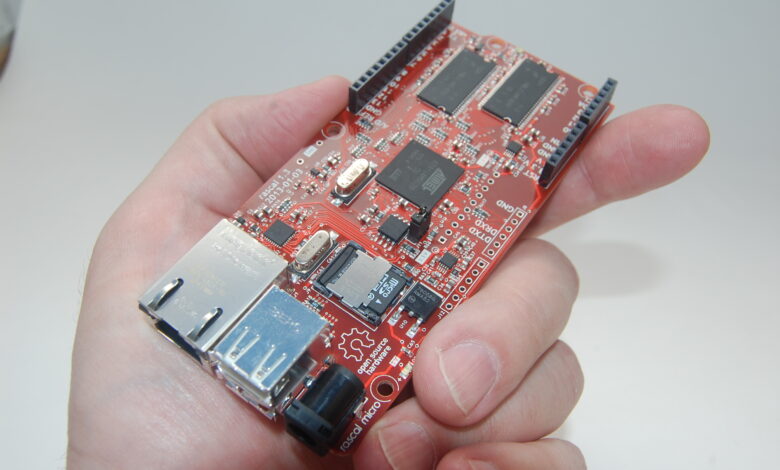
A conventional desktop spreads its parts across a motherboard, plug-in memory modules, a graphics card and other add-ons. An SBC integrates the essentials onto a single board. Most modern boards include a system-on-chip (SoC) that combines the CPU, graphics and often other accelerators; soldered or socketed RAM; storage through microSD, eMMC or an M.2 slot; and a set of ports such as USB, Ethernet, HDMI and general-purpose input/output (GPIO) pins for connecting sensors, motors and other hardware.
Because everything is on one board, SBCs are compact, draw relatively little power and are easy to embed inside another product. That is the core reason they matter.
A short history of single board computers
SBCs appeared soon after the first commercial microprocessors in the 1970s. Early boards such as the KIM-1, released in 1976, were aimed at engineers and hobbyists who wanted to learn and experiment with a microprocessor without building an entire system from separate cards. Through the 1980s and 1990s, SBCs found a steady home in industrial and embedded applications, where standards such as PC/104 let engineers stack compact, rugged boards inside machines.
The consumer turning point came in 2012 with the Raspberry Pi, a low-cost, credit card sized board created to encourage computer science education. It showed that a genuinely useful computer could be cheap enough for students and hobbyists to experiment with freely. A wave of alternatives followed, and ARM-based processors, which are designed for low power use, became the norm for many boards.
Hobbyist boards vs industrial SBCs
The term “single board computer” covers two quite different markets. Hobby and education boards are optimized for low price and a large community. Industrial single board computers are built for reliability in demanding environments and for long product lifecycles. Choosing the wrong type is a common mistake in commercial projects.
| Factor | Hobby and education boards | Industrial and embedded SBCs |
|---|---|---|
| Main goal | Low cost, learning, prototyping | Reliability, uptime, certification |
| Operating temperature | Typically commercial range | Often extended range for heat and cold |
| Availability | Models change as new versions launch | Long-term availability commitments are common |
| I/O | USB, HDMI, GPIO header | Serial ports, CAN bus, isolated I/O, expansion standards |
| Durability | Suited to desks and homes | Designed for vibration, dust and electrical noise |
| Support | Community forums | Vendor engineering support and documentation |
A practical rule: prototype on whatever board is fastest to work with, but if the product will be deployed in the field for years, plan the production hardware around a board designed for that environment and lifecycle.
Where single board computers are used today
Industrial automation and monitoring
SBCs act as small controllers and data collectors on production lines, in pumping stations and inside equipment. They read sensors, run control logic, log data and pass it to supervisory systems. Their small size lets them fit inside cabinets and enclosures where a full PC would not. Related topics such as integrating automation with fiber laser systems show how embedded computing supports modern manufacturing.
Internet of Things and smart buildings
Gateways that collect data from many sensors and forward it to the cloud are often built on SBCs. In homes, hobbyists use them to run home automation hubs, network ad blockers, media servers and security camera recorders.
Transportation, energy and medical devices
Rugged SBCs appear in vehicle telematics, rail systems, energy management and kiosks. In medical and laboratory equipment, embedded boards handle display, data capture and connectivity, although these products must meet strict regulatory requirements that go well beyond choosing hardware.
Education and skills training
Low-cost boards let students learn programming, Linux, electronics and networking with real hardware. Hands-on projects build the kind of practical skills that feed into many of the career prospects for computer science graduates, from embedded engineering to cybersecurity.
Prototyping and product development
Startups and engineering teams use SBCs to prove an idea quickly before investing in custom hardware. Some products ship with the same board or a compute module version of it, which reduces development time.
Trends shaping the future of single board computers
On-board AI acceleration
More boards now include neural processing units (NPUs) or GPUs designed to run machine learning models locally. That enables tasks such as object detection on a camera feed, anomaly detection on machine vibration data or voice commands without sending everything to the cloud. Local inference reduces latency, saves bandwidth and can help with privacy.
Edge computing
Rather than streaming raw data to a central data center, organizations increasingly process it near the source and send only results. SBCs are a natural fit for these edge nodes. The approach also makes systems more resilient, because a site can keep operating if its internet connection drops.
Faster storage and connectivity
Many newer boards support PCIe and NVMe storage, faster Ethernet and newer Wi-Fi and Bluetooth standards, with cellular modules available for remote sites. This narrows the performance gap between SBCs and small desktop PCs for many workloads.
Architecture choice: ARM, x86 and RISC-V
ARM dominates low-power boards, while x86 SBCs remain popular in industrial settings where compatibility with existing Windows or Linux software matters. RISC-V, an open instruction set architecture, is gaining attention and appearing on more development boards, although its software ecosystem is still maturing compared with ARM and x86.
Security and long-term maintenance
As more SBCs sit on networks in the field, security features such as secure boot, hardware trust modules and reliable remote update mechanisms are becoming baseline requirements rather than extras. Planning how devices will be patched over their lifetime is now part of choosing a board.
How to choose a single board computer for a project
- Define the workload. Simple sensor logging needs far less processing than running computer vision.
- List the required I/O. Count the serial ports, network interfaces, displays, cameras and GPIO lines you need.
- Check the environment. Temperature, vibration, dust and power quality determine whether a consumer board is acceptable.
- Confirm software support. Look for a maintained operating system image, drivers and documentation.
- Plan for lifecycle. For commercial products, ask how long the board will be manufactured and supported.
- Budget the whole system. Include the power supply, enclosure, cooling, storage and any certification costs, not just the board.
Do not overlook power, cooling and storage
Many problems blamed on the board are really supply problems. An underpowered or noisy power supply can cause random reboots and corrupted storage, so use the supply the manufacturer recommends or an industrial-grade equivalent. Faster processors also run hot under sustained load; a heatsink, fan or fanless metal enclosure keeps performance from throttling. Finally, microSD cards are convenient for development but can wear out under constant writes, so for anything that logs data around the clock, eMMC or an SSD is usually the more dependable option, combined with a read-only or carefully configured file system where possible.
SBCs are part of a broader shift toward distributed, connected computing, which also shapes how and where people work. For a wider view, see our article on future workplace innovations, and browse the Tech category for more.
Frequently asked questions
What is the difference between a single board computer and a microcontroller?
An SBC usually runs a full operating system such as Linux and has more memory and processing power. A microcontroller runs a single program directly on the hardware, uses less power and is suited to simple, real-time control tasks.
Can a single board computer replace a desktop PC?
For light tasks such as web browsing, documents and media playback, recent boards can work. For demanding software, gaming or heavy multitasking, a desktop or laptop is still the better choice.
Why use an industrial SBC instead of a Raspberry Pi?
Industrial boards are designed for wider temperature ranges, vibration and electrical noise, offer industrial interfaces, and typically come with long-term availability and vendor support, which matters for products deployed for years.
What operating systems run on single board computers?
Most run Linux distributions. Depending on the board, options can also include Android, real-time operating systems and, on x86 boards, Windows.
Are single board computers good for AI projects?
Yes, for running trained models locally, especially on boards with an NPU or GPU. Training large models still requires much more powerful hardware.