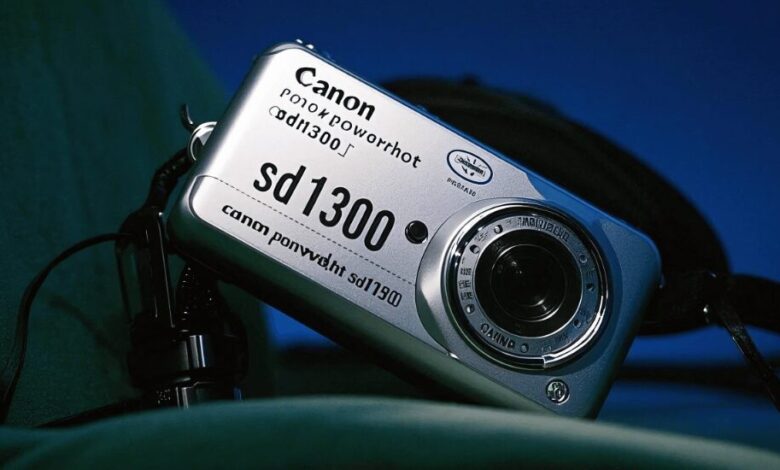
The Canon PowerShot SD1300 IS is a 12.1-megapixel pocket camera from early 2010 with a 1/2.3-inch CCD sensor, a 4x optical zoom (28 to 112mm equivalent), optical image stabilization and a 2.7-inch screen. It sold new for about $199.99 and was also sold as the Digital IXUS 105 outside North America and the IXY 200F in Japan. Today working used copies typically change hands somewhere around $60 to $150, mostly because buyers want the distinctive CCD look that modern phones do not produce. Below are the specs, what it does well and badly, fair used prices, an inspection checklist and the settings that get the best from it.
Canon PowerShot SD1300 IS specifications
| Specification | Detail |
|---|---|
| Other names | Digital IXUS 105 (Europe, Asia), IXY 200F (Japan) |
| Announced | February 2010 |
| Sensor | 1/2.3-inch CCD, 12.1 effective megapixels |
| Processor | Canon DIGIC 4 |
| Max image size | 4000 x 3000 pixels |
| Lens | 4x optical zoom, 28 to 112mm equivalent, f/2.8 to f/5.9 |
| Stabilization | Optical (lens-shift) Image Stabilizer |
| ISO | 80 to 1600, plus Auto |
| Screen | 2.7-inch LCD, about 230,000 dots, no touch, no viewfinder |
| Video | 640 x 480 at 30 fps, Motion JPEG, mono sound |
| Files | JPEG only (no RAW from Canon firmware) |
| Storage | SD, SDHC, SDXC and older MMC formats |
| Battery | NB-6L (NB-6LH also fits), roughly 230 shots per charge by CIPA rating |
| Weight | About 140 g with battery and card |
| Colors | Silver, blue, green, pink and brown |
The three names describe one camera. You will also see “IXUS 105” without “Digital,” because Canon simplified its naming around that time. Specs, accessories and manuals are the same for all versions, which widens your search when shopping.
Why this camera is popular again
Two things drive the renewed interest. Phone cameras have converged on a heavily processed look, with strong noise reduction, HDR and sharpening. At the same time, many younger buyers have discovered that older point-and-shoot cameras produce images that simply look different: slightly softer, with abrupt highlights, distinctive color and a flash snapshot feel that filters struggle to copy.
The SD1300 IS sits near the end of the CCD era for Canon’s slim compacts. Earlier IXUS and ELPH models used CCD sensors, according to Canon’s own model history as documented for the IXUS line, and during 2010 Canon began moving the range to CMOS sensors starting with its “HS” models. That timing, plus a metal body and a genuinely wide 28mm lens, is why this particular model shows up so often in “best cheap CCD camera” discussions.
Be realistic about what you are buying, though. The character comes from technical limits, not from features. A current phone beats this camera on dynamic range, low light, focusing speed and video. People buy the SD1300 IS because they want those limits and a single-purpose device. If you want the opposite, a phone that does more, our list of iPhone apps worth downloading is the other side of the coin.
Image quality in real use
Good light
Outdoors between ISO 80 and 200, the camera produces clean, pleasant 12MP JPEGs. Center detail at the wide end is fine for small and medium prints and more than enough for social media. Colors lean warm and friendly, which suits people and everyday scenes.
Low light
The small sensor struggles above ISO 400. Noise reduction smears fine detail, ISO 800 is usable for small images, and ISO 1600 is a last resort. The built-in flash is small and harsh, which is part of the “party snapshot” look some people want, but it falls off quickly beyond a few feet.
Highlights
Like most CCD compacts, it clips bright areas abruptly. A person against a bright sky will lose either the sky or the face. The fix is old-school: shoot with the light behind you or in open shade, and dial in a little negative exposure compensation when the scene is bright.
Lens and stabilization
The 28mm wide end was wider than many compacts of the time and works well for rooms, groups and street scenes. The 112mm long end is enough for portraits and details, not wildlife or sports. The aperture closes from f/2.8 to f/5.9 as you zoom, so indoors at full zoom the camera will push ISO up or fire the flash. Shoot at or near the wide end and walk closer whenever the light is dim.
The optical stabilizer is effective. With a steady grip you can often get sharp handheld shots at fairly slow shutter speeds at 28mm. Leave it on continuous for normal shooting.
Video is a bonus, not a reason to buy
Video is standard definition only: 640 x 480 at 30 frames per second, in Motion JPEG, with mono audio and no zooming while recording. Files are large for their quality, and on a modern TV the footage looks soft. If video matters, the SD1400 IS records 720p, and any modern phone is far better.
Battery, cards and transfers
The camera uses the NB-6L battery. The later NB-6LH fits the same slot and is the better buy. The format was used across many Canon cameras, including the PowerShot S90, S95, S120 and several SX-series models, so third-party batteries and chargers remain easy to find. Expect real capacity to fall short of the label, and carry a spare. Remember that spare lithium batteries go in carry-on bags, not checked luggage, when you fly.
For memory cards, a 16GB or 32GB SDHC card is the safe choice even though SDXC is supported, and speed class makes no practical difference. Always format the card in the camera. The USB port is the old mini-B type, so a cheap USB card reader is usually the easiest way to copy photos to a computer or phone.
Unlocking RAW and manual control with CHDK
Canon’s firmware records JPEG only and offers no full manual exposure. The main workaround is CHDK (Canon Hack Development Kit), free third-party software that runs from the memory card at startup and leaves Canon’s own firmware untouched. It is the standard route to RAW on this entire camera family, and the project has published builds for the IXUS 105 / SD1300.
Depending on the build, CHDK can add:
- RAW or DNG capture, so you can process files with modern software.
- Manual shutter speed control, including long exposures.
- A live histogram and overexposure warnings.
- An intervalometer for time-lapse shooting and scripting.
Two caveats. The build must match your camera’s exact firmware version, which you check on the camera before downloading. And CHDK does not change the sensor. RAW gives you more editing room, but processing RAW files heavily removes some of the JPEG character many buyers are after. It is best treated as a bonus for long exposures and experiments. Use it at your own risk, and follow the project’s instructions carefully.
What a used SD1300 IS costs
Prices move with trends and seasons, so treat these as rough, typical ranges rather than fixed values.
| Condition | Typical price range | What you usually get |
|---|---|---|
| Untested or “as-is” | About $25 to $45 | Body only, may not work |
| Working, visibly worn | About $55 to $85 | Scratches, third-party battery and charger |
| Good and complete | About $90 to $130 | Clean screen and body, battery, charger |
| Boxed or near-mint, rarer color | About $140 to $200 | Box and manual; pink and green often cost more |
Add a spare battery, a memory card and a card reader if you need them. Above roughly $200 you are paying collector prices; at that level a used enthusiast compact with a larger sensor and native RAW, such as an older Sony RX100 or Canon PowerShot S-series model, is a more capable camera, though it will not look the same.
Checklist before you buy
- Power on and zoom all the way in and out. Grinding, stalling or hesitation is a red flag.
- Watch for a “Lens Error, Restart Camera” message. It is the classic fatal fault on slim Canon compacts and usually means grit or a damaged lens barrel.
- Take photos of a plain wall and the sky. Spots that stay in the same place across frames suggest dust or debris inside the lens.
- Check the screen at full brightness for dead pixels, color casts or pressure marks.
- Fire the flash several times. Very slow recycling suggests a tired battery or flash circuit.
- Open the battery door and inspect the contacts for green or white corrosion.
- Ask for sample photos taken recently with the actual camera, and confirm what battery and charger are included.
Common faults
- Lens error: sometimes cleared by removing the battery for a minute and restarting, but often mechanical damage that costs more to repair than the camera is worth.
- Colored bands or strange lines in photos: can indicate a failing sensor or its electronics. Not worth repairing at this price.
- Camera shuts off right away: usually a weak or worn battery. Try a known-good battery before assuming the camera is dead.
How it compares with related models
| Camera | Sensor | Lens | Video | Notes |
|---|---|---|---|---|
| PowerShot SD1300 IS | 12.1MP CCD | 4x, 28 to 112mm | 640 x 480 | Metal body, wide 28mm start |
| PowerShot SD1400 IS | 14.1MP CCD | 4x, 28 to 112mm | 720p | Slimmer, HD video, uses a different battery (NB-4L) |
| PowerShot SD3500 IS | 14.1MP CCD | 5x, 24 to 120mm | 720p | 3.5-inch touchscreen, shares the NB-6L battery |
| PowerShot A495 | 10MP CCD | 3.3x zoom | 640 x 480 | Budget plastic body, runs on AA batteries |
The SD1300 IS earns its place on build quality, the 28mm lens and a battery that is easy to find. The SD1400 IS is the better choice if you want HD video, and the SD3500 IS goes wider and bigger on screen size.
Settings that get the most out of it
- Use Program mode rather than Smart Auto so the camera keeps your ISO and white balance choices.
- Set ISO 80 or 100 outdoors instead of Auto, which tends to raise ISO sooner than necessary.
- Set exposure compensation to about minus one-third to protect highlights.
- Set white balance manually indoors to reduce orange casts from warm bulbs.
- Turn the flash off near windows for softer light, or use it on purpose for the retro snapshot look.
- Use macro mode for close-ups; the camera can focus very close at the wide end.
Who should buy one
It is a good buy if you want CCD-era photos, mostly shoot in daylight, enjoy a simple single-purpose camera and plan to spend under about $120. It also makes a sturdy, inexpensive first camera for a teenager. Skip it if you need good video, strong low-light performance, fast focusing for kids and pets, or native RAW. And for important events, such as a wedding, hire a professional with modern gear; our guide to finding the perfect wedding photographer for your big day explains what to look for.
Frequently asked questions
Is the Canon PowerShot SD1300 IS still worth buying?
It is worth buying if you specifically want the CCD image look in a small, cheap camera and can find a tested copy with a battery at a fair price. As a general-purpose camera, a modern phone is better.
Is the SD1300 IS the same as the IXUS 105?
Yes. Canon sold the same camera as the PowerShot SD1300 IS in the Americas, the Digital IXUS 105 in Europe and Asia, and the IXY 200F in Japan. Accessories and specifications are the same.
What battery does the Canon SD1300 IS use?
It uses the Canon NB-6L battery, and the higher-capacity NB-6LH fits as well. Third-party versions and chargers are still widely available.
Can the SD1300 IS shoot RAW?
Not with Canon’s firmware, which saves JPEG only. Third-party CHDK software, which runs from the memory card, can add RAW or DNG capture and manual controls if you install the build that matches your firmware version.
Does the Canon SD1300 IS record HD video?
No. It records 640 x 480 video at 30 frames per second. The SD1400 IS from the same year records 720p if you want HD.